

Cron
The Cron service allows for the execution of a Function periodically at a fixed time, date, or intervals.
Properties
Section titled “Properties ”Allow the user to specify a cron expression. Cron expressions are used to create firing schedules such as “At 8:00am every Monday through Friday” or “At 1:30am every last Friday of the month”.
A cron expression is a string of 6 or 7 fields separated by white space. Fields can contain any of the allowed values, along with various combinations of the allowed special characters for that field. The fields are as follows:
| Field Name | Mandatory | Allowed Values | Allowed Special Characters |
|---|---|---|---|
| Seconds | YES | 0-59 | , - * / |
| Minutes | YES | 0-59 | , - * / |
| Hours | YES | 0-23 | , - * / |
| Day of month | YES | 1-31 | , - * ? / L W |
| Month | YES | 1-12 or JAN-DEC | , - * / |
| Day of week | YES | 1-7 or SUN-SAT | , - * ? / L # |
| Year | NO | empty, 1970-2099 | , - * / |
So cron expressions can be as simple as this: * * * ? * * or more complex, like this:
0/5 14,18,3-39,52 * ? JAN,MAR,SEP MON-FRI 2002-2010
Cron expressions examples
| Expression | Meaning |
|---|---|
| 0 * * ? * * | Every minute |
| 0 */2 * ? * * | Every 2 minutes |
| 0 */5 * ? * * | Every 5 minutes |
| 0 0 * ? * * | Every hour |
| 0 0 */4 ? * * | Every four hours |
| 0 0 0 * * ? | Every day at midnight (12am) |
| 0 0 6 * * ? | Every day at 6am |
| 0 0 12 */7 * ? | Every 7 days at noon |
| 0 0 12 15 * ? | Every month on the 15th, at noon |
| 0 0 12 L * ? | Every month on the last day of the month, at noon |
| 0 0 12 ? JAN * | Every day at noon in January only |
| 0 0 12 ? JAN,FEB,MAR,APR * | Every day at noon in January, February, March and April |
| 0 11 11 11 11 ? | Every November 11th at 11:11am |
| 0 15 10 ? * 6#3 | Every month on the third Friday at 11:15am |
Events
Section titled “Events ”CronEvent
Section titled “CronEvent ”Activated when the cron fires the schedule specified by the cron expression.
Examples
Section titled “Examples ”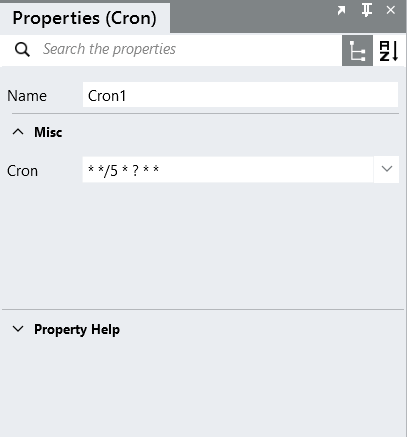
Execute every 5 minutes until the service is stopped
Interval execution times are:
00:00:00
00:05:00
00:10:00
00:15:00
00:20:00
…
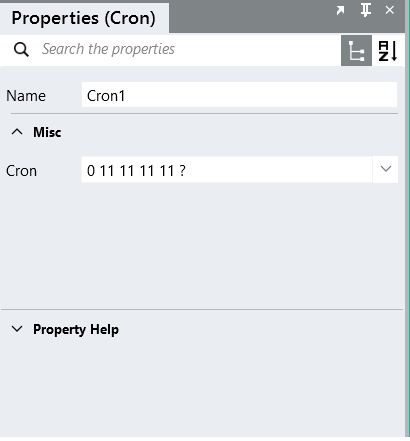
Execute every November 11th at 11:11am.
Interval execution times are:
2017-11-11 11:11:00
2018-11-11 11:11:00
2019-11-11 11:11:00
…