File Open
FileOpen keeps a file open to speed up a large number of write operations.
This function creates a FileHandle object in its execution path that can be used by the TextFileWrite or BinaryFileWrite functions to write to the opened file.
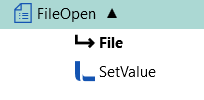
You can also use the SetValue function to assign values to the FileHandle’s ‘Append’ property to add content that way. See the Examples below.
Properties
Section titled “Properties”File Path
Section titled “File Path”The full path to the file that has to be kept open for writing.
Is Text
Section titled “Is Text”Indicates if the file to open (or create) is a text file.
Codepage
Section titled “Codepage”Only displayed if the Is Text property option is checked.
Selects the character encoding to use when writing text to the file.
The default Codepage is the one used in your operating system.
File Does Not Exist
Section titled “File Does Not Exist”You can opt to create the file or return an error if the file already exists.
File Exists
Section titled “File Exists”Only displayed if the Is Text property option is checked.
Specifies what to do if the file already exists.
Options:
- Append Data: Any text that is written to the file is added to the end of the file.
- Increment File Name: Adds a number to the file name to make it unique, starting with 1.
- Overwrite File: Replaces all content in the file with the new content.
- Throw Exception: Stops the function’s processing and returns an error.
Examples
Section titled “Examples”Suppose you have a long list of lines of text to write to a file. Using the FileOpen function, as shown below, will run much quicker than doing it without the FileOpen function.
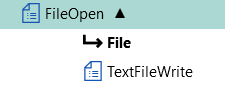
Set the ‘File path’ property of the TextFileWrite function to FileOpen.File.FileHandle.
Set the ‘Target’ property of the SetValue function to FileOpen.File.FileHandle.Append or FileOpen.File.FileHandle.AppendLine. ‘AppendLine’ will add a line terminator after the text.