

REST Overview Guide
The following sections cover a general overview of hosting and implementing REST web services in Linx with the use of the RESTHost function.
- The flow of a REST request
- The data structure of REST request in Linx
- Supported HTTP status codes
- Supported Media Types
REST Request Flow
Section titled “REST Request Flow”When a request is made to a RESTHost service operation, the following flow takes place:
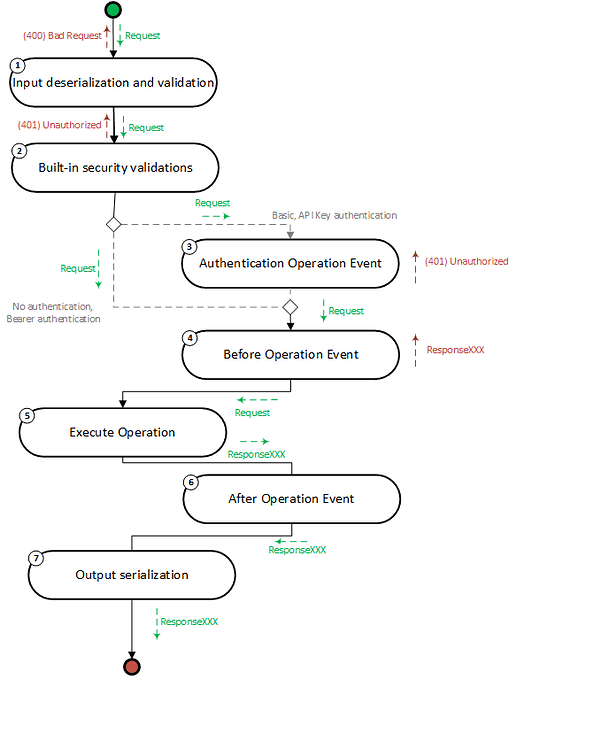
- Input deserialization and validation: After a request is received, Linx performs deserialization and validation of the inputs (query string, request body).
- Built-in security validations: Linx then executes built-in .NET security validations according to the operation’s applied HTTP security scheme (Basic, Bearer or API Key).
- Authentication event: Authentication event which is executed for Basic and API Key authentication. This allows you to add custom authentication logic for these schemes.
- Before operation event: Optional event which allows you to add custom logic to requests, before the operation is executed.
- Execute operation: Executes the operation in which the custom logic for the endpoint is built.
- After operation event: Optional event which allows you to add custom logic to requests, after the operation has been executed, regardless of success.
- Output serialization: Serialization of the outputs returned from the operation.
- Error handler: The whole flow is encapsulated in a built-in error handler.
Input Deserialization and Validation
Section titled “Input Deserialization and Validation”After a request is received, the incoming request’s parameters, such as the request body or query values, are deserialized and then validated according to the API definition.
If a validation error occurs, a 400 Bad Request response is returned along with a response body that contains the details of the invalid parameters.
Built-in Security Validations
Section titled “Built-in Security Validations”Linx then executes built-in .NET security validations according to the operation’s applied HTTP security scheme.
Currently, the RESTHost service supports the following built-in security schemes:
- HTTP Basic
- HTTP Bearer
- API Key
When a request is made to an operation that has one of the above security schemes applied to it, the following will happen:
Validation of Authentication Parameters
Section titled “Validation of Authentication Parameters”- Basic and API Key: Validate format (in header, in query etc.)
- Bearer: Automatically verify JWT token
If unsuccessful, a 401 Unauthorized response is returned.
If successful, details associated with the authenticated user are passed through to the operation via:
- For HTTP Basic and API Key security schemes, details are passed through to the operation in
AuthenticationData. - For the HTTP Bearer security scheme, details are passed through to the operation in
HTTPContext.User.
Authentication Event
Section titled “Authentication Event”OperationEvents_Authenticate
The authentication event is executed for HTTP Basic and API Key authentication schemes. You must add custom authentication logic in this event to handle the verification of Basic and API Key authentication credentials. An example of such logic would be confirming the validity of a API Key from a database.
By default, this event returns $.Result.Data.HttpContext.User.IsAuthenticated = False, so you must add logic in this event to indicate that authentication was successful. If authentication fails, a 401 Unauthorized response is returned.
Before Operation Event
Section titled “Before Operation Event”OperationEvents_BeforeOperation
You can add custom logic to this event, which will execute before the operation is executed. This applies to all operations and can be used for things such as custom logging, throttling, or additional custom authentication.
Execute Operation
Section titled “Execute Operation”The operation that contains your custom logic is executed once all necessary validations have occurred.
By default, all operations are set to have a default response of 200 OK. If you want to return a different HTTP status code, such as 201 or 402, you can by setting a custom response.
After Operation Event
Section titled “After Operation Event”OperationEvents_AfterOperation
You can add custom logic to this event, which will fire after any operation has executed, regardless of the result.
Output Serialization
Section titled “Output Serialization”The outgoing response properties are deserialized according to the API specification.
Error Handler
Section titled “Error Handler”The whole flow is encapsulated in a built-in error handler. If an error occurs at any stage in the flow, a 500 Internal Server Error will be returned. You have the option of including or omitting error details from the response by altering the Return server errors of the RESTHost service to True.
Structure of Linx REST Request
Section titled “Structure of Linx REST Request”When a request is received or a response is returned, it is structured as follows:
Highest-level request/response object.
| Data | Type | Included in |
|---|---|---|
| HTTPContext | httpContext | Requests/Responses |
| AuthenticationData | authenticationData | Requests with security events |
| Input Parameters | inputParameter | Requests |
| ResponseXXX | responseXXX | Responses |
HTTPContext
Section titled “HTTPContext”Object containing all metadata and additional information associated with the request.
| HTTPContext | Type | Example |
|---|---|---|
| Connection | connection | |
| ContentLength | Integer | 12322 |
| ContentType | String | Application/json |
| Cookies | List | x-api-key=aadedwde |
| Headers | List | |
| Host | String | localhost |
| IsHttps | Boolean | true |
| Items | List | [‘User1’,‘User2’] |
| Method | String | GET |
| Path | String | /users |
| PathBase | String | /LinxSampleAPI/restHOST |
| Protocol | String | HTTP/2 |
| Query | List | |
| QueryString | String | ?x-api-key= xsdshsdj37sh |
| Scheme | String | https |
| User | user |
Connection
Section titled “Connection”Connection details associated with the source of the request.
| Connection | Type | Example |
|---|---|---|
| ID | String | -485183435770848 |
| LocalIpAddress | String | ::1 |
| LocalPort | Integer | 443 |
| RemoteIpAddress | String | ::1 |
| RemotePort | String | 55023 |
Header
Section titled “Header”Headers are used to pass additional information with the request. Typical usage involves the Authorization header used for authentication schemes such as Basic, Bearer or API Key.
| Header | Type | Example |
|---|---|---|
| Key | String | Authorization |
| Value | List<String> | Bearer Xhsjjs73890s0 |
Query values are used to pass additional information usually related to the request such as a filter value.
These are passed in with the HTTPContext.QueryString of the request URL, they are then deserialized into the following format:
| Query | Type | Example |
|---|---|---|
| Key | String | x-api-key |
| Value | List<String> | [‘xsdshsdj37sh’] |
Contains information related to the authenticated user from the built-in security validations as well as from the OperationEvents_Authenticate event.
You are able to alter this property in order to pass data through to the subsequent events and operations.
An example of this could be if you validate an API key with custom logic in the OperationEvents_Authenticate event by matching the key to a user, you can then return the user’s id from the database which can be passed on to the main operation. This avoids re-extracting the identifiers that might be of use in the operation.
For the HTTP Bearer authentication scheme, the unique_name claim value is extracted from the JWT token and passed in with the User.Name property.
| User | Type | Example |
|---|---|---|
| AuthenticationType | String | 2 |
| IsAuthenticated | Boolean | true |
| Name | String | 2233 |
Input Parameters
Section titled “Input Parameters”When parameters are passed in with a request in either the request URL, query string or request body, they are deserialized and accessible in the $.Input.Data property of the operation and events:
| Input Parameter | Type | Example |
|---|---|---|
| URL parameters | String | /users/45 |
| Query values | String | Name=John |
| Header values | String | Name=John |
| Cookies | String | Name=John |
| Request Body | Text/XML/JSON/Filestream/URL Encoded | {“user”: {“name”: “John”}} |
ResponseXXX
By default, when an operation completes, a (200) OK response status code with a response body of no-content is returned. However, you are also able to return custom response codes as well as custom response content which can be basic types or objects containing nested types and objects.
| Output | Type |
|---|---|
| Response Body | JSON/XML/Binary |
AuthenticationData
When the built-in security validations have succeeded, details relating to the authenticated user will be passed on to any operations and events down the request flow.
| AuthenticationData | Type | Example |
|---|---|---|
| SchemeName | String | BasicAuth |
| SchemeType | schemetype | 1 |
| ApiKey | String | ApiKey |
APIKey
Section titled “APIKey”The API Key object will contain the below information if the security scheme for the operation is API Key. If the authentication is HTTP Basic, then this object will be NULL.
| ApiKey | Type | Example |
|---|---|---|
| TokenLocation | tokenLocation | 2 |
| TokenName | String | X-API-KEY |
| ProvidedToken | String | 0imfnc8mVLWwsAawjYr4Rx-Af50DDqtlx |
HTTP Status Code Support
Section titled “HTTP Status Code Support”General Status Code Support
Section titled “General Status Code Support”The following HTTP Status Codes are supported in the RESTHost operation responses.
Built-in
| Status Code | Phrase | Use |
|---|---|---|
| 200 | OK | Default response code for all operations unless set otherwise. |
| 401 | Unauthorized | Default response code for security validation failures or authentication failures. |
| 400 | Bad Request | Default response for incorrect structure of request. |
| 415 | Unsupported Media Type | Default response for unsupported media in the content-type header. |
| 500 | Internal Server Error | Default response code when an unhandled exception occurs in the request flow. Users are able to include or omit the server errors from the response. |
Custom
| Status Code | Phrase | Use |
|---|---|---|
| 1XX | Informational | Custom Response |
| 2XX | Success | Custom Response |
| 3XX | Redirection | Custom Response |
| 4XX | Client Error | Custom Response |
| 5XX | Server Error | Custom Response |
Operation/Event Response Codes
Section titled “Operation/Event Response Codes”Security validations
Section titled “Security validations”In the case of invalid authentication credentials or submission format, a (401) Unauthorized response is returned.
Before Operation event
Section titled “Before Operation event”If you alter the $.Result.Data.HTTPContext.StatusCode to anything (even 200) within this event’s custom logic, a response with the code will be returned and the request flow will cease.
Authentication event
Section titled “Authentication event”The OperationEvents_Authenticate event is set by default to return a result value of $.Result.Data.HtttpContext.User.IsAuthenticated which triggers a (401) Unauthorized response.
Therefore, you must add custom logic in this event to set the value of $.Result.Data.HtttpContext.User.IsAuthenticated in the case of HTTP Basic and API Key security schemes.
Execute Operation
Section titled “Execute Operation”By default, all operations have a response Status Code of (200) OK unless set otherwise or an exception is thrown within the operation’s logic; in that case, a (500) Internal Server Error is returned.
If you want to return a custom response code like 201 or 404, then you are also able to configure it in your operation logic. This is done by adding the relevant HTTP Response Codes to your API definition, and then setting the $.Result.Data.HTTPContext.StatusCode property within the operation to the code you require. Following this, you can set the relevant response body.
After Operation event
Section titled “After Operation event”You are able to override the HTTPContext.StatusCode of the operation in this event; you are able to set it as any response code.
Supported Media Types
Section titled “Supported Media Types”Input parameters are deserialized into the relevant TYP.
The following data/media types are supported in requests:
| Input Data Type | Location | Accepted Content-Type Header |
|---|---|---|
| Basic Data Type (integer, string etc) | URL, Query, Body | - application/json - text - application/xml |
| Object, List | Body | - application/json - application/xml |
| Binary / Filestream | Body | - application/octet-stream |
If you attempt to make a request with an incorrect content-type header or an unsupported content-type, then a (415) Unsupported Media Type response will be returned automatically.
Other guides for hosting a REST API
Section titled “Other guides for hosting a REST API”- Get Started - Hello World
- Before and After Operation Events
- Working with inputs
- Handling responses
- Securing Your API
- Generating API Documentation
- Sample Solution: CRUD and File Operations
Sample
Section titled “Sample”View our sample solution on GitHub.