

Connection Editor
The connection string specifies the configuration values required to connect to the database. The content of the connection string depends on the database driver used.
To access the Connection Editor, click on the … icon.
A typical form looks like this:
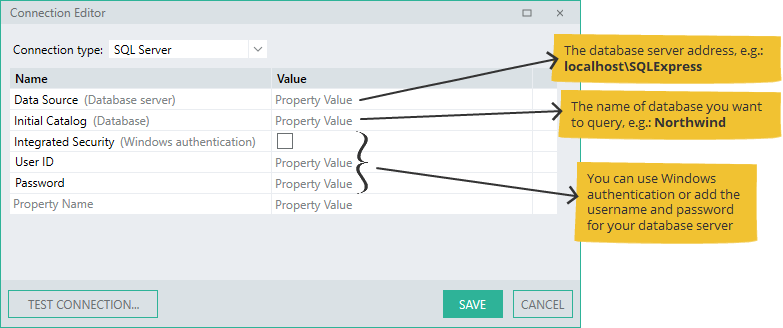
Once you have set up a connection to your database, you can create and execute your own SQL queries. Go here for details on SQL Editor.
Examples of connections
Section titled “Examples of connections”SQL Server
Section titled “SQL Server”- Not named, Windows authentication
Data [Source=serverAddress;Initial Catalog=databaseName;Integrated Security=True;]
- Named server, no Windows authentication
Data Source=serverName\instanceName;Initial Catalog=databaseName;Integrated Security=;User ID=username;Password=password;
Example string:
Data Source=JOHNC\SQLSERVER2016;Initial Catalog=employees;Integrated Security=False;User ID=sa;Password=myexamplepwd123
Oracle
Section titled “Oracle”- Using TNS-names entry
Data Source=TNSname;User ID=username;Password=password;
- Without using TNS-names entry
Data Source=(DESCRIPTION=(ADDRESS=(PROTOCOL=TCP)(HOST=serverAddress)(PORT=port))(CONNECT_DATA=(SERVER=DEDICATED)(SERVICE_NAME=serviceName)));User ID=username;Password=password;
OLE DB
Section titled “OLE DB”- Windows authentication
Provider=sqloledb;Data Source=_serverAddress_;Initial Catalog=_databaseName_;Integrated Security=SSPI;
- No Windows authentication
Provider=sqloledb;Data Source=_serverAddress_;Initial Catalog=_databaseName_;Integrated Security=;User ID=_username_;Password=_password_;
- Microsoft Access database
Driver={Microsoft Access Driver (\*.mdb)};DBQ=_databaseFilePath_;
- System Data Source Name, Windows authentication
DSN=_dataSourceName_;Trusted\_Connection=Yes; - System Data Source Name, no Windows authentication
DSN=_dataSourceName_;Uid=_username_;Pwd=_Password_;
Examples f ODBC connections to databases on cloud servers
Section titled “Examples f ODBC connections to databases on cloud servers”Note: The DSN property is not used when connecting to a database on a cloud server.
Uid=root;Pwd= password;Driver={MySQL ODBC 8.0 ANSI Driver};Server=localhost;Database=myDatabase;
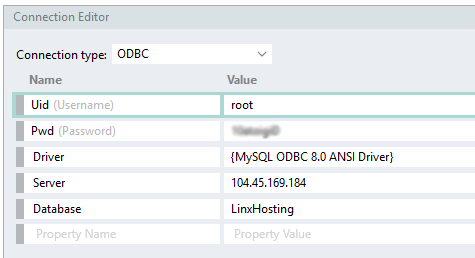
PostgreSQL
Section titled “PostgreSQL”Uid=postgres;Pwd=password;Driver={PostgreSQL ANSI(x64)};Server=localhost;Database=myDatabase;
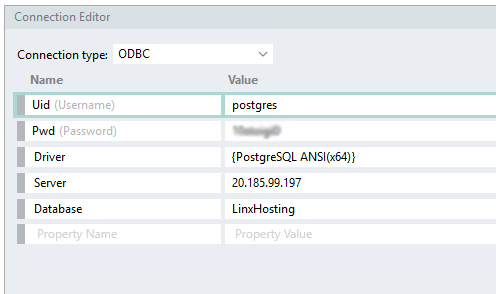
SQLite
Section titled “SQLite”Driver={SQLite3 ODBC Driver};Database=F:\myDatabase.db;
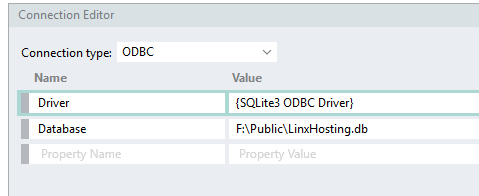
Connection strings
ODBC