

Execute Stored Procedure
ExecuteStoredProcedure
Section titled “ExecuteStoredProcedure ”ExecuteStoredProcedure runs a stored procedure on a database. It allows specifying values for parameters to send to the stored procedure and it returns the values of any out-parameters. If the stored procedure returns one or more result sets (tables), its rows can be received one at a time in a loop, or all at once in a list.
Properties
Section titled “Properties ”Connection type
Section titled “Connection type ”The type of database driver to use to connect to the database.
The supported driver types are:
- SQL Server
- Oracle
- OLE DB
- ODBC
Alternatively, instead of creating a new connection, choose Use transaction to use a Transaction object from a BeginTransaction function.
Connection string
Section titled “Connection string ”The connection string that specifies how to connect to the database.
Transaction
Section titled “Transaction ”Visible if Connection type is set to ‘Use transaction’.
Allows to select the Transaction object from a BeginTransaction function.
Stored procedure
Section titled “Stored procedure ”The name of the stored procedure on the database to call. Use the Stored Procedure Editor to discover all available stored procedures in the database.
Click on the … icon to open the Stored Procedure Editor.
Stored Procedure Editor
Section titled “Stored Procedure Editor”Stored procedure
Based on the DB connection a list of stored procedures are returned. Select the stored procedure to call.
Parameters and result sets of the selected stored procedure are displayed.
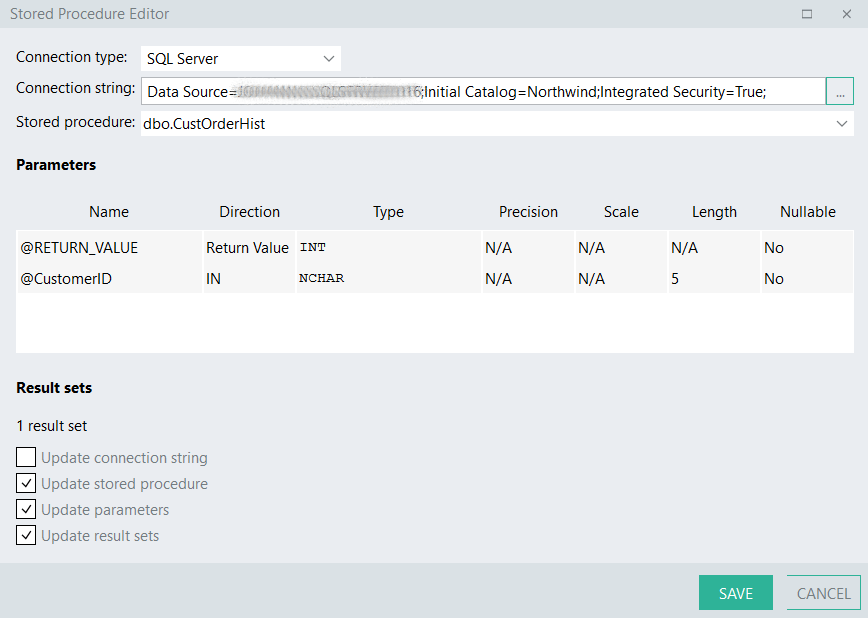
Select the relevant *Update*-checkboxes to indicate what to update when you click the SAVE button.
Parameters
Section titled “Parameters”Define the collection of parameters that the stored procedure expects.
Each IN or IN/OUT parameter will appear as a property in the Parameter values section.
Each IN/OUT, OUT, and Return value will be included as properties in the function’s result set.
Timeout
Section titled “Timeout ”Time (in seconds) to wait for the procedure to execute. 0 equals no timeout.
Parameter values
Section titled “Parameter values”This section will display when one or more parameters were defined with a direction of ‘IN’ or ‘IN/OUT’.
[Parameter name]
The value to pass for the [Parameter name] parameter.
Result sets
Section titled “Result sets ”The PL/SQL code of a stored procedure may contain ‘SELECT’ statements which cause a result set (table) to be returned by each one of these statements.
Number of result sets
The number of result sets returned by the stored procedure. You can click the ellipse (…) button to open the Stored procedure editor to try detect the result set fields from the database.
Result set fields
One property will appear for each result set for configuring its fields.
Output option
- First row
The function will return only the first row of each result set. If any result set returns no data, an error will be thrown. - First row, else empty row
The function will return only the first row of each result set. When a result set returns no data, the function will return a row containing default values. - List of rows
The function will return the rows of each result set in separate lists. - Row by row
The function will return the rows of each result set one row at a time in a loop. This is recommended whenever you expect to retrieve many items, but you don’t need the complete list of items all at once.
Definition
Section titled “Definition ”Contains the values of all IN/OUT, OUT, and Return value parameters configured in the Parameters property.
The definition also contains one property for each result set containing the data (unless the Output option was set to Row by row).