

ExecuteSQL
ExecuteSQL executes custom SQL queries against a SQLite database.
By default, the function provides a loop to iterate through the data row by row.
Quick Steps
Section titled “Quick Steps”- Use the Connection Editor (click the … icon in the Connection string property) to create and test your connection string.
- Use the SQL Editor to add a query to the SQL property. If the query returns data, place your row-processing logic inside the “ForEachRow” loop.
Properties
Section titled “Properties”Use Transaction
Section titled “Use Transaction”Use a defined Transaction from a BeginTransaction function for the query.
Connection string
Section titled “Connection string”Displayed when Use Transaction is not selected.
The connection string that specifies how to connect to the database.
Transaction
Section titled “Transaction”Displayed when Use Transaction is selected.
Select the transaction object from a BeginTransaction function.
The query or command to execute. It can include any SQL supported by the database driver.
You can write SQL statements using the SQL Editor.
Timeout
Section titled “Timeout”The timeout value for the query in seconds.
Result type
Section titled “Result type”Defines the columns and data types returned by your SQL query.
- If Linx Designer has database access and no changes are needed, this property is automatically populated.
- If there is no database connection or the query cannot run at design time, the columns must be manually defined.
Steps:
- Click the Results Editor icon (…).
- Select the Result Type for each column.
- Enter a Result Name.
You can create a Complex Type and assign the entire query output to it.
Steps:
- Create a Complex Type.
- In the Results Editor, select your Complex Type from the Custom Type drop-down.
- For each column, select the matching name from the Result Name drop-down.
Click Create from SQL to refresh the column definitions from the database. Use this to reset any manual changes back to what the query returns.
Return options
Section titled “Return options”Select how the data is to be returned:
- First row
Returns the first row. Reports an error if the query returns no rows. - First row, else null
Returns the first row, or null if the query returns no rows. - List of rows
Returns all rows as a list, available for use later in the process without re-executing the query. - Row by row
Returns one row at a time via a “ForEachRow” loop. Recommended for large result sets where loading everything into memory at once is not needed.
Avoiding “database is locked” when writing inside a loop
Section titled “Avoiding “database is locked” when writing inside a loop”When ExecuteSQL runs in Row by row mode, it keeps the database connection open for the entire ForEachRow loop. Placing a second ExecuteSQL (INSERT, UPDATE, or DELETE) inside that loop causes SQLite to raise:
SQLite Error 5: 'database is locked'SQLite uses file-level locking. The open read connection holds a shared lock that blocks writes from any other connection.
Solution
Section titled “Solution”There are two approaches.
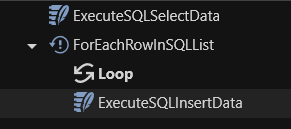
List of rows + ForEach: Change the outer ExecuteSQL return mode to List of rows. This fetches all rows and closes the connection immediately. You then loop over the returned list using a ForEach step. No read connection is active at that point, so writes proceed without conflict.
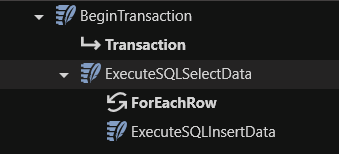
BeginTransaction: Wrap both ExecuteSQL steps in a BeginTransaction function using the Immediate or Exclusive isolation level. Both steps share the same connection, so no second connection attempts to acquire a lock. Use this approach when you need both the read and write to be atomic.
When to use each mode
Section titled “When to use each mode”| Scenario | Mode |
|---|---|
| Read rows, write to a different database or external system | Any |
| Very large result sets where memory is a concern and no writes are needed | Row by row |
| Read rows, then write to the same database inside the loop | List of rows + ForEach or BeginTransaction wrapping both steps |
| Combine read and write in a single transaction | BeginTransaction wrapping both steps |