

REST Host
The RESTHost allows you to assemble and publish a REST web service endpoint by implementing its web methods through events. This can be done using a Swagger API description file, which imports one event for each path defined in the file.
Need help creating an API definition?
Section titled “Need help creating an API definition?”Use the Linx OpenAPI3 Definition Designer to create a valid OpenAPI 3 definition. Once created, add it to the RESTHost function’s API definition property as described below.
Properties
Section titled “Properties”API definition
Section titled “API definition”A valid OpenAPI 3 definition for your web API in JSON or YAML format. Ensure that it is valid according to the OpenAPI 3 specification before adding it to the API Definition Editor. You can validate your definition online at Swagger Hub.
Exceptions
Section titled “Exceptions”The following aspects of the OpenAPI 3 specification are not supported by the RESTHost:
- Variant type definitions, for example:
- Empty schema definitions
- Objects with empty “properties” lists
- Polymorphism:
oneOfanyOfallOfdiscriminator
- Content type wildcards
Base URI
Section titled “Base URI”Configure the base URL of the web service to be hosted on the server where it is deployed.
In Linx, use the + wildcard character instead of your hostname in the Base URL property:
https://+:{port}/{path}
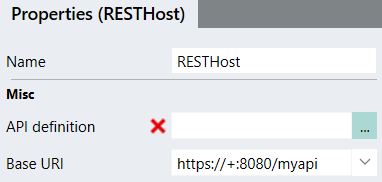
When the service is deployed, it will use the current server.
Auth config
Section titled “Auth config”Authentication configuration can be defined in the security schemas of the API description. These settings are automatically pulled into the Auth config editor, from which you can update them.
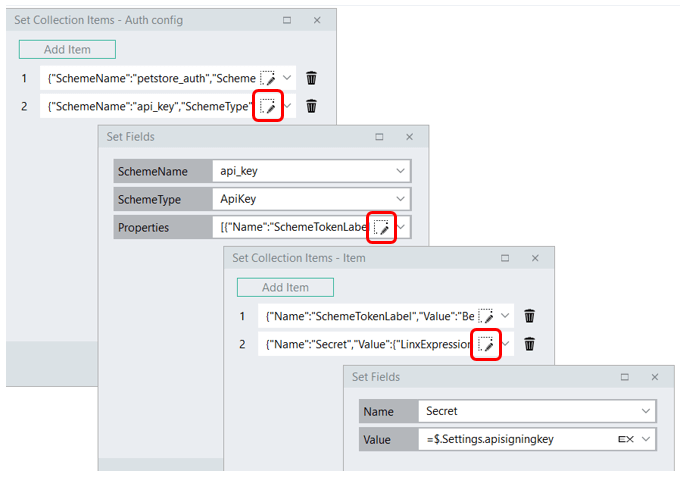
To add an item or field’s associated detail, click the Editor icon.
Return server errors
Section titled “Return server errors”Show details for internal server errors in HTTP responses.
Values: true / false
Max connections
Section titled “Max connections”The maximum number of concurrent connections to accept (per client).
Max request size
Section titled “Max request size”The maximum allowed size of any request body, in megabytes.
Default: 30
API documentation
Section titled “API documentation”Select to generate documentation for your API.
Options:
- Redocly
- Swagger UI
To access your generated documentation, append /swagger or /redocly to your Base URI, depending on the documentation type. For more on API documentation, go here.
CORS origins
Section titled “CORS origins”A list of allowed origin URLs for cross-origin resource sharing.
Click the editor icon to add relevant URLs.
Authenticate
Section titled “Authenticate”Select to show the Authenticate event handler. This handler will execute for every authentication scheme associated with an operation before the execution of the operation.
Before operation
Section titled “Before operation”Select to show the Before-Operation event handler. This handler will execute before the execution of any operation.
After operation
Section titled “After operation”Select to show the After-Operation event handler. This handler will execute after the execution of any operation.
- OpenAPI Specification
- Wikipedia: Representation state transfer (REST)
- Swagger
- All WCF timeouts explained
- RESTHost Overview Guide
- Get Started - Hello World
- Before and After operation events
- Working with inputs
- Handling responses
- Securing your API
- Deploying and common issues
- Generating API documentation
- Sample solution: CRUD and file operations
- Cloud server API deployment