DB Bulk Copy
DBBulkCopy
Section titled “DBBulkCopy ”DBBulkCopy allows you to efficiently copy a large number of rows to a table in a SQL Server or Oracle database.
This function creates a Loader object in its execution path. Use the SetValue function to add the rows that you want to insert. See the example below.
Properties
Section titled “Properties ”Connection type
Section titled “Connection type ”The type of database driver to use to connect to the database.
The supported driver types:
- SQL Server
- Oracle
Connection string
Section titled “Connection string ”The connection string that specifies how to connect to the database.
Specify columns at runtime
Section titled “Specify columns at runtime ”Indicates whether the destination table and its columns are specified at runtime instead of being selected at design time.
When this property is unchecked, the destination table and columns are selected at design time using the Table property, and the Loader object’s Write property is a record with a field for each of the selected columns.
When this property is checked, the Table property is replaced by the Table name and Column names properties, whose values are evaluated at runtime. In this case the Loader object’s Write property is a list of text values, where each value in the list corresponds to the column at the same position in the Column names list.
Timeout
Section titled “Timeout ”The timeout value in seconds. 0 indicates the bulk copy operation will wait indefinitely.
Table
Section titled “Table ”The name of the destination table. This property is only shown when Specify columns at runtime is unchecked.
Click on the … icon to open the Editor.
Destination Table Properties
Connection type
The type of database driver to use to connect to the database.
The supported driver types:
- SQL Server
- Oracle
Connection string
The connection string that specifies how to connect to the database.
Table
Select the relevant table to copy to.
Columns
Indicate which columns to copy to.
Table name
Section titled “Table name ”The name of the destination table. This property is required and is only shown when Specify columns at runtime is checked.
Column names
Section titled “Column names ”The names of the destination columns to write to, in the order in which their values are written. This property is required and is only shown when Specify columns at runtime is checked.
The order of the names in this list determines the order of the values that must be assigned to the Loader object’s Write property.
Batch size
Section titled “Batch size ”The number of rows to collect in a transaction before it is committed to the server.
Example
Section titled “Example ”Suppose you have a CSV text file with many records that need to be loaded into a database table. Using the DbBulkCopy function as shown below will run much quicker than doing it using the more generic ExecuteSQL function.
Steps:
-
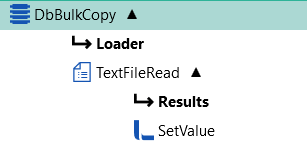
From the Database plugin, drag the DBBulkCopy function onto the design canvas.
-
Set the DBBulkCopy properties (see above for details).
-
From the File plugin, drag the TextFileRead function onto the design canvas (nested below your DBBulkCopy function).
-
Set the TextFileRead properties to read all the rows from the source file that you want to copy across to your destination database.
-
From the Linx plugin, drag the SetValue function onto the design canvas (nested below the TextFileRead function).
-
Set the Target property of the SetValue function to DbBulkCopy.Loader.Write.

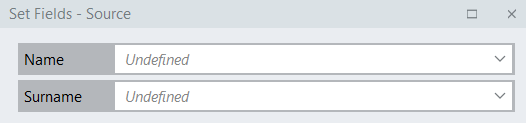
- Then click the Set Fields editor button next to the Source property to assign the values to the table’s columns.