BeginTransaction
This function creates a Transaction in its execution path that can be used by the SQLite ExecuteSQL function.
The transaction is automatically committed after all functions in the execution path complete.
If an error occurs, all SQL statements within the transaction are rolled back.
Properties
Section titled “Properties”Connection string
Section titled “Connection string”The connection string that specifies how to connect to the database.
Isolation level
Section titled “Isolation level”Controls when SQLite acquires locks on the database file. The three options map directly to SQLite’s native BEGIN variants. Learn more
| Isolation Level | Lock acquired | Other connections can read | Other connections can write |
|---|---|---|---|
| Deferred (Default) | On first read or write | ✅ | ✅ (until first write) |
| Immediate | On transaction open (write lock) | ✅ | ❌ |
| Exclusive | On transaction open (exclusive lock) | ❌ | ❌ |
Example
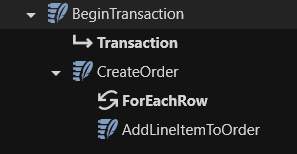
Section titled “Example”Suppose you have a sales order with multiple line items that need to be added to the database.
Using ExecuteSQL without BeginTransaction creates a new database connection for each item written. By using BeginTransaction, all items are added within the same transaction.
If an error occurs during order creation, the entire transaction is rolled back, ensuring no incomplete orders are stored in the database. Adding multiple records within the same transaction also significantly improves execution speed.
Steps:
- Add a BeginTransaction function to your Solution.
- Configure the Connection string.
- Add your ExecuteSQL functions to your workflow.
- For each ExecuteSQL, select the Use transaction property.
- Set the Transaction property (only displayed when Use transaction is selected) to ‘BeginTransaction.Transaction’.