

Excel Read
ExcelRead reads data from an Excel spreadsheet file.
Properties
Section titled “Properties ”File path
Section titled “File path ”The file path of the xlsx file to read.
Read type
Section titled “Read type ”Read specific ranges
Range information should include enough sheet information to identify the sheet to read the data from. Omitting the sheet name or sheet index will read the data from the first sheet.
Read ranges in all worksheets
Range data will be read from all sheets filtered by the sheet name filter. Range information should not include any sheet names or indexes.
Sheet name filter
Section titled “Sheet name filter ”This property is only available if Read type is “Read ranges in all worksheets”.
It takes a regular expression that filters the sheets that are read e.g. “^invoice” will only read data from sheets that starts with “invoice” - therefore, “invoice123” will be read, but “fooinvoice” will be ignored.
Range
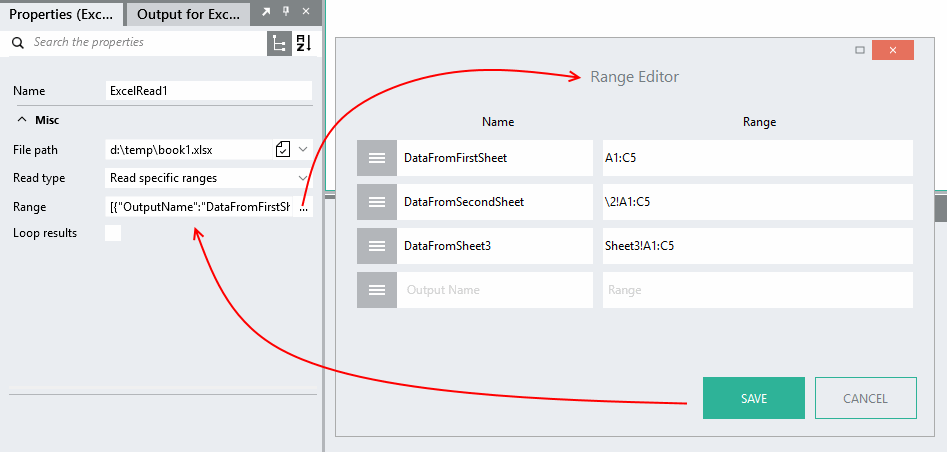
Section titled “Range ”The range property specifies an Name and a Range in the format {"Name":"Range1","Range":"Sheet1!A2:G4"}. Use the Range Editor to edit it. You can also specify multiple ranges.
Name can be any valid Linx name.
Range is specified using the A1 reference style, e.g. 'A1:D3', or 'Sheet3!B3'. You can also reference a sheet using its index e.g. '\1!B3' will reference the first sheet in the workbook.
When the range-end is unknown, make the range-end effectively “unlimited” by providing a value like “D99999”. Linx will only read the rows containing data; thus, if your range-end is “D9999”, but you only have 50 rows of data, ExcelRead will stop after 50 rows.
Loop results
Section titled “Loop results ”Read type = Read specific ranges
This option is available when at least one of the ranges references multiple rows.
If checked, the rows will be returned one at a time in a loop. If more than one range is specified, a separate loop is created for each range.
If not checked, a list containing all the rows will be created. If more than one range is specified, one list for each range will be returned.
Read type = Read ranges in all worksheets
If checked, the sheets are returned one at a time in a loop.
If not checked, a list containing all the sheets is created.