

GraphQLServer
GraphQLServer exposes your data as a GraphQL API. Client applications can connect to your GraphQL server to query your data.
Properties
Section titled “Properties”Schema
Section titled “Schema”The GraphQL schema for your GraphQL server.
Click on the […] icon to open the Schema editor.
An event is automatically created for each query that is included in the schema, as shown below:
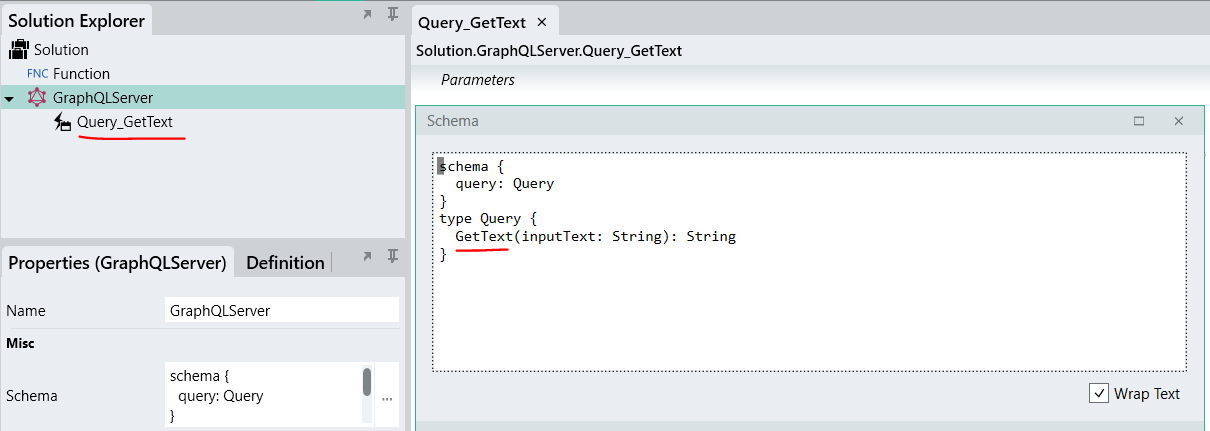
You can add any Linx functions to the events to handle the requests sent to your GraphQL service.
Base URL
Section titled “Base URL”The URL where the GraphQL server will be published, e.g. http://localhost:8024/MyGraphQLServer.
Show server errors
Section titled “Show server errors”Show details for internal server errors in HTTP responses.
Max connections
Section titled “Max connections”The maximum number of concurrent connections to accept.
Max request size
Section titled “Max request size”The maximum allowed size of any request body in megabytes.
CORS origins
Section titled “CORS origins”A list of allowed origin URLs for cross-origin resource sharing.
Scheme
Section titled “Scheme”The security scheme to use.
Before operation
Section titled “Before operation”Show the Before-Operation event handler. This handler will execute before the execution of any operation.
After operation
Section titled “After operation”Show the After-Operation event handler. This handler will execute after the execution of any operation.