Expression Editor Functions
String
Section titled “String”Contains
Section titled “Contains”Returns a boolean value which is true if the string in brackets is in the base string and false if it is not.
Syntax: [baseString].Contains([referenceString]) myStringVariable.Contains("Some Words") myStringVariable.Contains(anotherStringVariable) ("Some Words").Contains("Words")
Note:
This check is case sensitive so ("Some Words").Contains("Words") will return true while ("Some Words").Contains("words") will return false.
EndsWith
Section titled “EndsWith”Returns a boolean value which is true if the string in brackets is at the end of the base string and false if it is not.
Syntax:
[baseString].EndsWith([referenceString])
Examples:
myStringVariable.EndsWith("Some Words")
myStringVariable.EndsWith(anotherStringVariable)
("Some Words").EndsWith(myStringVariable)
("Some Words").EndsWith("Words")
Note:
This check is case sensitive so ("Some Words").EndsWith("Words") will return true while ("Some Words").EndsWith("words") will return false.
FormatWith
Section titled “FormatWith”Returns a string where the format items ({0}, {1}, etc.) are replaced with string representations of the corresponding parameters.
Syntax:
[baseString].FormatWith([(params) parameterArray])
Examples:
myStringVariable.FormatWith(Boolean1, "5")
"{0} is {1} years old".FormatWith(String1, Integer1)
IndexOf
Section titled “IndexOf”Returns the character index of the first occurrence of a reference string inside a base string. If the reference string is not in the base string then -1 is returned.
If a start index is specified, all occurrences of the reference string before that index will be ignored.
Syntax:
[baseString].IndexOf([referenceString], [(optional) startIndex])
Examples:
myStringVariable.IndexOf("Some Words")
myStringVariable.IndexOf(anotherStringVariable)
("Some Words").IndexOf(myStringVariable)
("Some Words").IndexOf("Words")
myStringVariable.IndexOf("Some Words", 3)
myStringVariable.IndexOf(anotherStringVariable, 10)
("Some Words").IndexOf(myStringVariable, 5)
("Some Words").IndexOf("Words", 4)
Note:
This check is case sensitive so ("Some Words").IndexOf("Words") will return 5 while ("Some Words").Contains("words") will return -1.
Insert
Section titled “Insert”Returns a new string which is equal to the base string with the reference string inserted at the specified index.
Syntax:
[baseString].Insert([startIndex], [referenceString])
Examples:
myStringVariable.Insert(2, "Some Words")
myStringVariable.Insert(5, anotherStringVariable)
("Some Words").Insert(3, myStringVariable)
("Some Words").Insert(2, "Words")
Note:
If the specified start index is less than 0 or more than the length of the base string then an exception will be thrown, so ("Some Words").Insert(4, "WORDS") will return “Some WORDS Words” while ("Some Words").Insert(20, "WORDS") will throw an exception.
LastIndexOf
Section titled “LastIndexOf”Returns the character index of the last occurrence of a reference string inside a base string. If the reference string is not in the base string then -1 is returned.
If a start index is specified, all occurrences of the reference string after that index will be ignored.
Syntax:
[baseString].LastIndexOf([referenceString], [(optional) startIndex])
Examples:
myStringVariable.LastIndexOf("Some Words")
myStringVariable.LastIndexOf(anotherStringVariable)
("Some Words").LastIndexOf(myStringVariable)
("Some Words").LastIndexOf("Words")
myStringVariable.LastIndexOf("Some Words", 3)
myStringVariable.LastIndexOf(anotherStringVariable, 10)
("Some Words").LastIndexOf(myStringVariable, 5)
("Some Words").LastIndexOf("Words", 4)
Note:
This check is case sensitive so ("Some Words").LastIndexOf("Words") will return 5 while ("Some Words").LastIndexOf("words") will return -1.
Length
Section titled “Length”Returns an integer value of the number of characters in the preceding string.
Syntax:
[baseString].Length
Examples:
myStringVariable.Length
("Some Words").Length
Note:
Spaces are counted as characters so ("Some Words").Length will return 10.
PadLeft
Section titled “PadLeft”Returns a new string which is equal to the base string padded with spaces at its start. If a pad character is specified, then it will be used for the padding instead of a space.
Syntax:
[baseString].PadLeft([width], [(optional) padCharacter])
Examples:
myStringVariable.PadLeft(2)
myStringVariable.PadLeft(2, 'a')
PadRight
Section titled “PadRight”Returns a new string which is equal to the base string padded with spaces at its end. If a pad character is specified, then it will be used for the padding instead of a space.
Syntax:
[baseString].PadRight([width], [(optional) padCharacter])
Examples:
myStringVariable.PadRight(2)
myStringVariable.PadRight(2, 'a')
Remove
Section titled “Remove”Returns a new string which is equal to the base string with all characters past the specified start index removed. If a count is specified then only that many characters are removed.
Syntax:
[baseString].Remove([startIndex], [(optional) count])
Examples:
myStringVariable.Remove(2)
myStringVariable.Remove(2, 2)
("Some Words").Remove(2)
("Some Words").Remove(2, 4)
Note:
If the specified start index is smaller than 0 or bigger than the length of the base string or the count added to the start index is beyond the length of the base string, then an exception will be thrown.
Replace
Section titled “Replace”Returns a new string which is equal to the base string with all occurrences of a specified original string inside the base string being replaced with the specified new string.
Syntax:
[baseString].Replace([originalString], [newString])
Examples:
myStringVariable.Replace(anotherStringVariable, someOtherStringVariable)
myStringVariable.Replace(anotherStringVariable, "Words")
("Some Words").Replace("Words", someOtherStringVariable)
("Some Words").Replace("Words", "words")
Note:
This operation is case sensitive so ("Some Words").Replace("Words", "word") will return “Some word” while ("Some Words").Replace("words", "word") will return “Some Words”.
Returns a list of strings which contains the base string split up on each space character. If a character is specified, then the string will be split on that character instead of on space.
Syntax:
[baseString].Split([(optional) character])
Examples:
myStringVariable.Split()
myStringVariable.Split('$')
("Some Words").Split()
("Some Words").Split('W')
StartsWith
Section titled “StartsWith”Returns a boolean value which is true if the string in brackets is at the beginning of the preceding string and false if it is not.
Syntax:
[stringToCheck].StartsWith([referenceString])
Examples:
myStringVariable.StartsWith("Some Words")
myStringVariable.StartsWith(anotherStringVariable)
("Some Words").StartsWith(myStringVariable)
("Some Words").StartsWith("Words")
Note:
This check is case sensitive so ("Some Words").StartsWith("Some") will return true while ("Some Words").StartsWith("some") will return false.
SubString
Section titled “SubString”Returns a string which is equal to the base string from a specified index onwards. If a length is specified then only that many characters are taken from the start index onwards.
Syntax:
[baseString].Substring([startIndex], [(optional) length])
Examples:
myStringVariable.Substring(2)
myStringVariable.Substring(2, 4)
("Some Words").Substring(2)
("Some Words").Substring(2, 3)
Note:
If the start index is negative or bigger than the length of the base string, an exception will be thrown.
ToBytes
Section titled “ToBytes”Converts a string value to a list of byte using the default encoding.
Syntax:
[baseString].ToBytes()
Examples:
myStringVariable.ToBytes()
("10").ToBytes()
ToBytesFromBase64
Section titled “ToBytesFromBase64”Converts a base64 string to a list of byte.
Syntax:
[base64String].ToBytesFromBase64()
Examples:
myStringVariable.ToBytesFromBase64()
ToDateTime
Section titled “ToDateTime”Returns a DateTime item using the current string and input format to perform the conversion.
Syntax:
[baseString].ToDateTime(format)
Examples:
myStringVariable.ToDateTime("yyyy/MM/dd HH:mm:ss")
ToDecimal
Section titled “ToDecimal”Converts a string value to a decimal number.
Syntax:
[baseString].ToDecimal()
Examples:
myStringVariable.ToDecimal()
("10.5").ToDecimal()
ToDouble
Section titled “ToDouble”Converts a string value to a double-precision floating-point number.
Syntax:
[baseString].ToDouble()
Examples:
myStringVariable.ToDouble()
("10.5").ToDouble()
ToInt32
Section titled “ToInt32”Converts a string value to a 32-bit signed integer.
Syntax:
[baseString].ToInt32()
Examples:
myStringVariable.ToInt32()
("10").ToInt32()
ToInt64
Section titled “ToInt64”Converts a string value to a 64-bit signed integer.
Syntax:
[baseString].ToInt64()
Examples:
myStringVariable.ToInt64()
("10").ToInt64()
ToLower
Section titled “ToLower”Returns a string equal to the base string but all in lower case.
Syntax:
[baseString].ToLower()
Examples:
myStringVariable.ToLower()
("Some Words").ToLower()
ToUpper
Section titled “ToUpper”Returns a string equal to the base string but all in upper case.
Syntax:
[baseString].ToUpper()
Examples:
myStringVariable.ToUpper()
("Some Words").ToUpper()
Returns a string equal to the base string with all spaces removed from the beginning and end.
Syntax:
[baseString].Trim()
Examples:
myStringVariable.Trim()
(" Some Words ").Trim()
TrimStart
Section titled “TrimStart”Returns a string equal to the base string with all spaces removed from the beginning.
Syntax:
[baseString].TrimStart()
Examples:
myStringVariable.TrimStart()
(" Some Words ").TrimStart()
TrimEnd
Section titled “TrimEnd”Returns a string equal to the base string with all spaces removed from the end.
Syntax:
[baseString].TrimEnd()
Examples:
myStringVariable.TrimEnd()
(" Some Words ").TrimEnd()
DateTime
Section titled “DateTime”AddDays
Section titled “AddDays”Returns a DateTime which is the specified number of days ahead of the base DateTime.
Syntax:
[baseDateTime].AddDays([numberOfDays])
Examples:
myDateTimeVariable.AddDays(2)
AddHours
Section titled “AddHours”Returns a DateTime which is the specified number of hours ahead of the base DateTime.
Syntax:
[baseDateTime].AddHours([numberOfHours])
Examples:
myDateTimeVariable.AddHours(2)
AddMilliseconds
Section titled “AddMilliseconds”Returns a DateTime which is the specified number of milliseconds ahead of the base DateTime.
Syntax:
[baseDateTime].AddMilliseconds([numberOfMilliseconds])
Examples:
myDateTimeVariable.AddMilliseconds(2)
AddMinutes
Section titled “AddMinutes”Returns a DateTime which is the specified number of minutes ahead of the base DateTime.
Syntax:
[baseDateTime].AddMinutes([numberOfMinutes])
Examples:
myDateTimeVariable.AddMinutes(2)
AddMonths
Section titled “AddMonths”Returns a DateTime which is the specified number of months ahead of the base DateTime.
Syntax:
[baseDateTime].AddMonths([numberOfMonths])
Examples:
myDateTimeVariable.AddMonths(2)
AddSeconds
Section titled “AddSeconds”Returns a DateTime which is the specified number of seconds ahead of the base DateTime.
Syntax:
[baseDateTime].AddSeconds([numberOfSeconds])
Examples:
myDateTimeVariable.AddSeconds(2)
AddYears
Section titled “AddYears”Returns a DateTime which is the specified number of years ahead of the base DateTime.
Syntax:
[baseDateTime].AddYears([numberOfYears])
Examples:
myDateTimeVariable.AddYears(2)
Returns a DateTime with time information stripped off.
Syntax:
[baseDateTime].Date
Examples:
myDateTimeVariable.Date
Returns an integer value of the day of the month.
Syntax:
[baseDateTime].Day
Examples:
myDateTimeVariable.Day
DayOfYear
Section titled “DayOfYear”Returns an integer value of the day of the year.
Syntax:
[baseDateTime].DayOfYear
Examples:
myDateTimeVariable.DayOfYear
Returns an integer value specifying the hour value captured in the base DateTime.
Syntax:
[baseDateTime].Hour
Examples:
myDateTimeVariable.Hour
Millisecond
Section titled “Millisecond”Returns an integer value specifying the millisecond value captured in the base DateTime.
Syntax:
[baseDateTime].Millisecond
Examples:
myDateTimeVariable.Millisecond
Minute
Section titled “Minute”Returns an integer value specifying the minute value captured in the base DateTime.
Syntax:
[baseDateTime].Minute
Examples:
myDateTimeVariable.Minute
Returns an integer value specifying the month value captured in the base DateTime.
Syntax:
[baseDateTime].Month
Examples:
myDateTimeVariable.Month
Second
Section titled “Second”Returns an integer value specifying the second value captured in the base DateTime.
Syntax:
[baseDateTime].Second
Examples:
myDateTimeVariable.Second
ToString
Section titled “ToString”Returns a string value of the DateTime variable in the specified format. The format can be any combination of formatting values as shown below.
Syntax:
[baseDateTime].ToString([formatString])
Allowed formatting values:
- Day d, dd, ddd, dddd 1, 01, Mon, Monday
- Month M, MM, MMM, MMMM 1, 01, Jan, January
- Year y, yy, yyyy 4, 14,
- Hours h, hh, H, HH 1, 01, 13, 13
- Minutes m, mm 6, 06
- Seconds s, ss 8, 08
- Milliseconds f, ff, fff, ffff, fffff, ffffff, fffffff 6, 61, 615, 6157, 61574, 615743, 6157436
- AM/PM t, tt A, AM
- Era gg A.D.
Time and Date Separators:
- , /, –
UTC Offset:
- z, zz, zzz +2, +02, +02:00
Examples:
myDateTimeVariable.ToString("yyyy-M-d hh:mm tt zz")
Returns an integer value specifying the year value captured in the base DateTime.
Syntax:
[baseDateTime].Year
Examples:
myDateTimeVariable.Year
Decimal
Section titled “Decimal”ToDouble
Section titled “ToDouble”Converts a decimal number to a double-precision floating-point number.
Syntax:
[baseDecimal].ToDouble()
Examples:
myDecimalVariable.ToDouble()
ToInt64
Section titled “ToInt64”Converts a decimal value to a 64-bit signed integer.
Syntax:
[baseDecimal].ToInt64()
Examples:
myDecimalVariable.ToInt64()
ToString
Section titled “ToString”Converts a decimal value to a string.
Syntax:
[baseDecimal].ToString()
Examples:
myDecimalVariable.ToString()
myDecimalVariable.ToString("0.##") - this will take a decimal value and convert it to a string value with two decimal places (e.g. convert ‘3.1474436’ to ‘3.15’).
Also see the Linx Community for more on this topic.
Double
Section titled “Double”ToDecimal
Section titled “ToDecimal”Converts a double-precision floating-point number to a decimal number.
Syntax:
[baseDouble].ToDecimal()
Examples:
myDoubleVariable.ToDecimal()
ToInt64
Section titled “ToInt64”Converts a double value to a 64-bit signed integer.
Syntax:
[baseDouble].ToInt64()
Examples:
myDoubleVariable.ToInt64()
Integer
Section titled “Integer”ToInt32
Section titled “ToInt32”Converts a 64-bit signed integer to a 32-bit signed integer.
Syntax:
[baseInteger].ToInt32()
Examples:
myIntegerVariable.ToInt32()
Determines whether a sequence contains any elements.
Syntax:
[list].Any([(optional) condition])
Examples:
listOfCars.Any()
listOfPeople.Any(person => person.Name == "John")
Average
Section titled “Average”Computes the average of a sequence of numeric values.
Syntax:
[list].Average([(optional) selector])
Examples:
listOfNumbers.Average()
listOfPeople.Average(person => person.Age)
Returns the number of elements in a sequence.
Syntax:
[list].Count([(optional) condition])
Examples:
listOfCars.Count()
listOfPeople.Count(person => person.Name == "John")
Returns the maximum value in a sequence of values.
Syntax:
[list].Max([(optional) condition])
Examples:
listOfNumbers.Max()
listOfPeople.Max(person => person.Age)
Returns the minimum value in a sequence of values.
Syntax:
[list].Min([(optional) selector])
Examples:
listOfNumbers.Min()
listOfPeople.Min(person => person.Age)
Computes the sum of a sequence of numeric values.
Syntax:
[list].Sum([(optional) selector])
Examples:
listOfNumbers.Sum()
listOfPeople.Sum(person => person.Age)
List(Byte)
Section titled “List(Byte)”ToBase64
Section titled “ToBase64”Returns the list of bytes as a Base64 string.
Syntax:
[listOfByte].ToBase64()
Examples:
listOfBytesVariable.ToBase64()
C# classes
Section titled “C# classes”C# has many useful classes, for example the Math class. These classes can be used in any of your Linx Expressions.
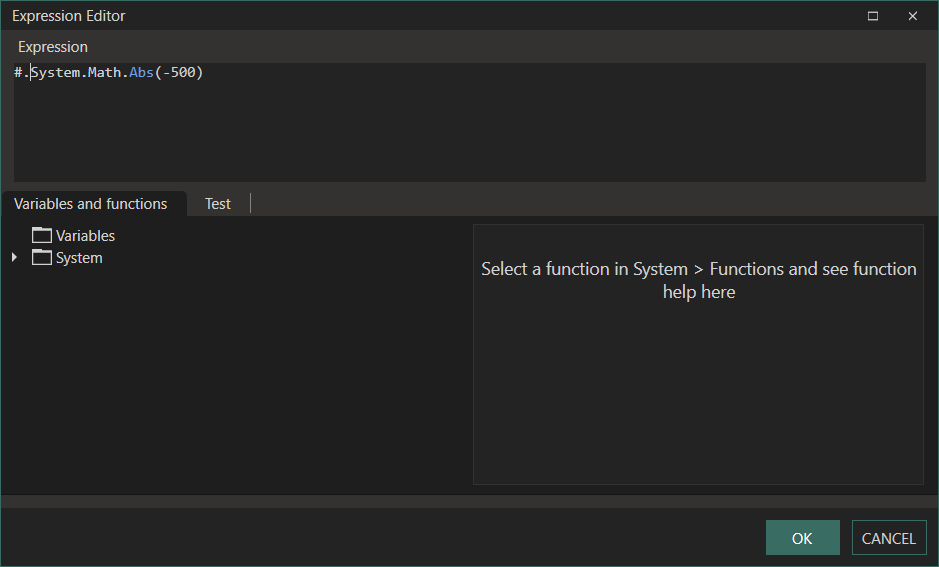
A #. construct can be used to expose any C# classes found under the System and System.IO namespaces.
Example:
To use the Math.Abs method, type #.System.Math.Abs(MyInteger) into an expression.