Xero Authentication
The Xero Authentication service enables authentication with Xero accounts for Xero applications. This service facilitates multi-tenant environments, securely stores authentication credentials, and manages token lifecycle. It also provides API endpoint access functions with integrated authentication handling.
Overview
Section titled “Overview”The service performs the following key functions:
- Facilitates authentication for new tenants/users
- Securely stores tenant authentication data (tokens, refresh tokens, and connection metadata)
- Handles authentication requests
- Automatically manages token lifecycle including refreshing expired tokens
Requirements
Section titled “Requirements”Prerequisites
Section titled “Prerequisites”- Registered Xero account
- Application created in Xero’s developer portal
- Pre-existing database to store tenant and token information
Authentication Flow
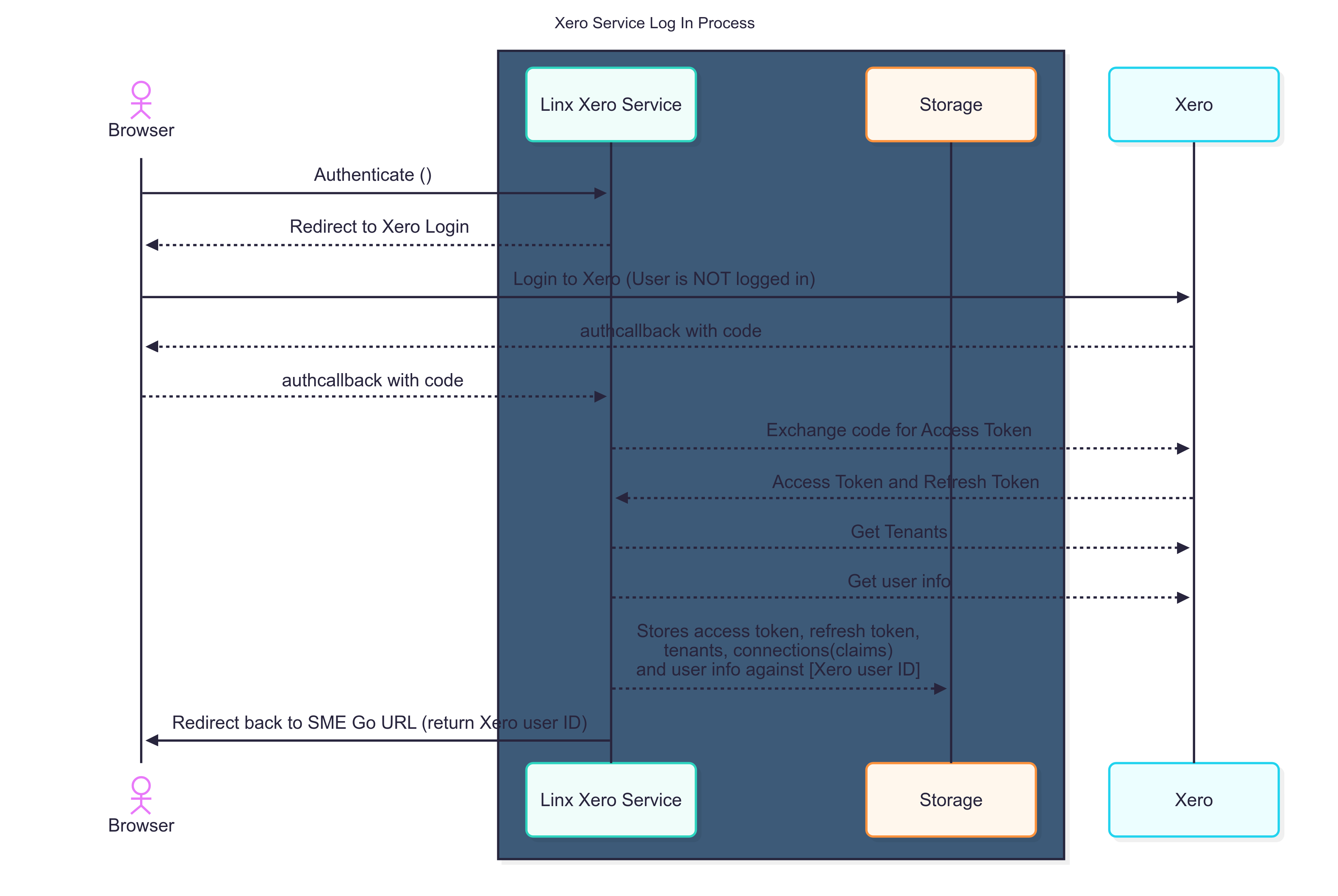
Section titled “Authentication Flow”The following diagram illustrates the Linx-to-Xero authentication process:
Service Configuration
Section titled “Service Configuration”The service requires the following configuration parameters:
| Parameter | Description |
|---|---|
| Authorization URI | The service endpoint handling authorization. The service listens for incoming requests at [authorization-uri]/authorize. Configure your Xero App’s Redirect URI to [authorization-uri]/callback. |
| Redirect URI | The endpoint where users are redirected after successful authorization, typically a confirmation page. |
| Client ID | The application identifier from your Xero App configuration. |
| Client Secret | The secure application key from your Xero App configuration. |
| Scope | Defines the access permissions for the service. “openid”, “profile”, and “offline_access” scopes are automatically included. For all available scopes, see: Xero OAuth2 Scopes. |
Database Connection
Section titled “Database Connection”Specifies the database for storing access and refresh tokens:
The service supports four database connection options:
- SQL Server: Microsoft SQL Server database storage
- SQLite: SQLite database storage
- PostgreSQL: PostgreSQL database storage
- Memory: In-memory storage (data persists only until service restart)
Note: Database must exist prior to service initialization. The service creates necessary database objects automatically. Required permissions include Create, Read, Update, and Write access.
| Parameter | Description |
|---|---|
| Connection String | Database connection string for token storage. A dedicated schema ([linx_jobscheduler]) is created for required tables. Not required when using memory storage. |
Authorization Process
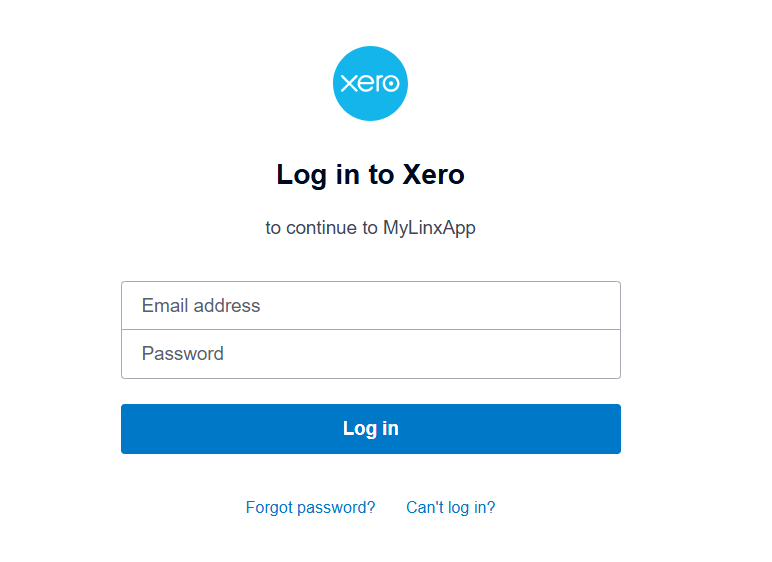
Section titled “Authorization Process”When the service is running (in debug mode or on a Linx server), the Authorization URL becomes accessible. This directs users to a Xero authentication screen where they must log in with their credentials.
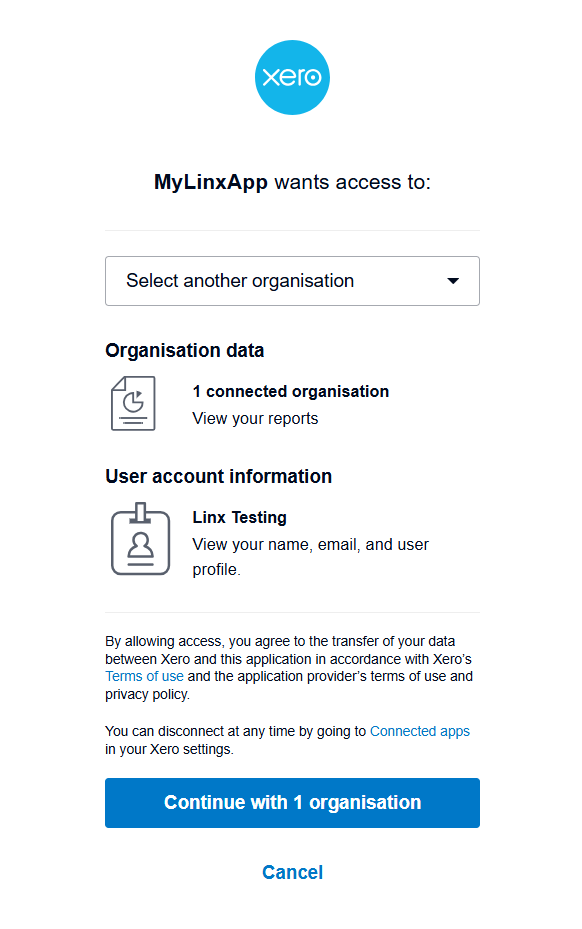
After authentication, users select the organization (tenant) they wish to authorize and complete the authorization process.
Upon completion, users are redirected to the configured Redirect URI. This endpoint receives a xeroUserId query parameter that must be captured and stored alongside user profile information (this profile data is not managed by Linx). The service only stores TenantID and token-related data; the xeroUserId serves as the reference identifier for future operations.

Important: The
xeroUserIdmust be persisted in your application as it is required for all subsequent operations, including API calls and tenant listing.
All authentication data is stored in the configured database. The table structure is managed by Linx and should not be directly accessed by external applications as the schema may change in future updates.
Service Functions
Section titled “Service Functions”The service provides the following functions that can be used in your Linx funcions:
GetTenants
Section titled “GetTenants”Returns all tenants (organizations) associated with the specified Xero user.
Parameter:
| Parameter | Description |
|---|---|
| Xero User ID | The authenticated user’s Xero ID. |
CallXeroAPI
Section titled “CallXeroAPI”Provides generic access to Xero API endpoints with integrated authentication handling. Specify the endpoint, and the service manages authentication using the provided credentials.
Parameters:
| Parameter | Description |
|---|---|
| Xero User ID | The authenticated user’s Xero ID, obtained during initial authentication. This must be stored with client data as business information |
| Tenant ID | The organization ID for the operation. Can be retrieved using the GetTenants function, which returns all tenants associated with the specified user. |
| Method | HTTP method for the request (supported methods: GET, POST, PUT, DELETE). |
| URL | The Xero API endpoint to call. Example: https://api.xero.com/api.xro/2.0/Reports/BalanceSheet for a balance sheet report. Endpoint must be within authorized scopes. |
| Query String | Query parameters as required by the endpoint. Consult Xero API documentation for endpoint-specific requirements. |
| Body | Request body data as required by the endpoint. Consult Xero API documentation for endpoint-specific requirements. |
Note: For a complete reference of available endpoints, see: Xero API Endpoint Documentation
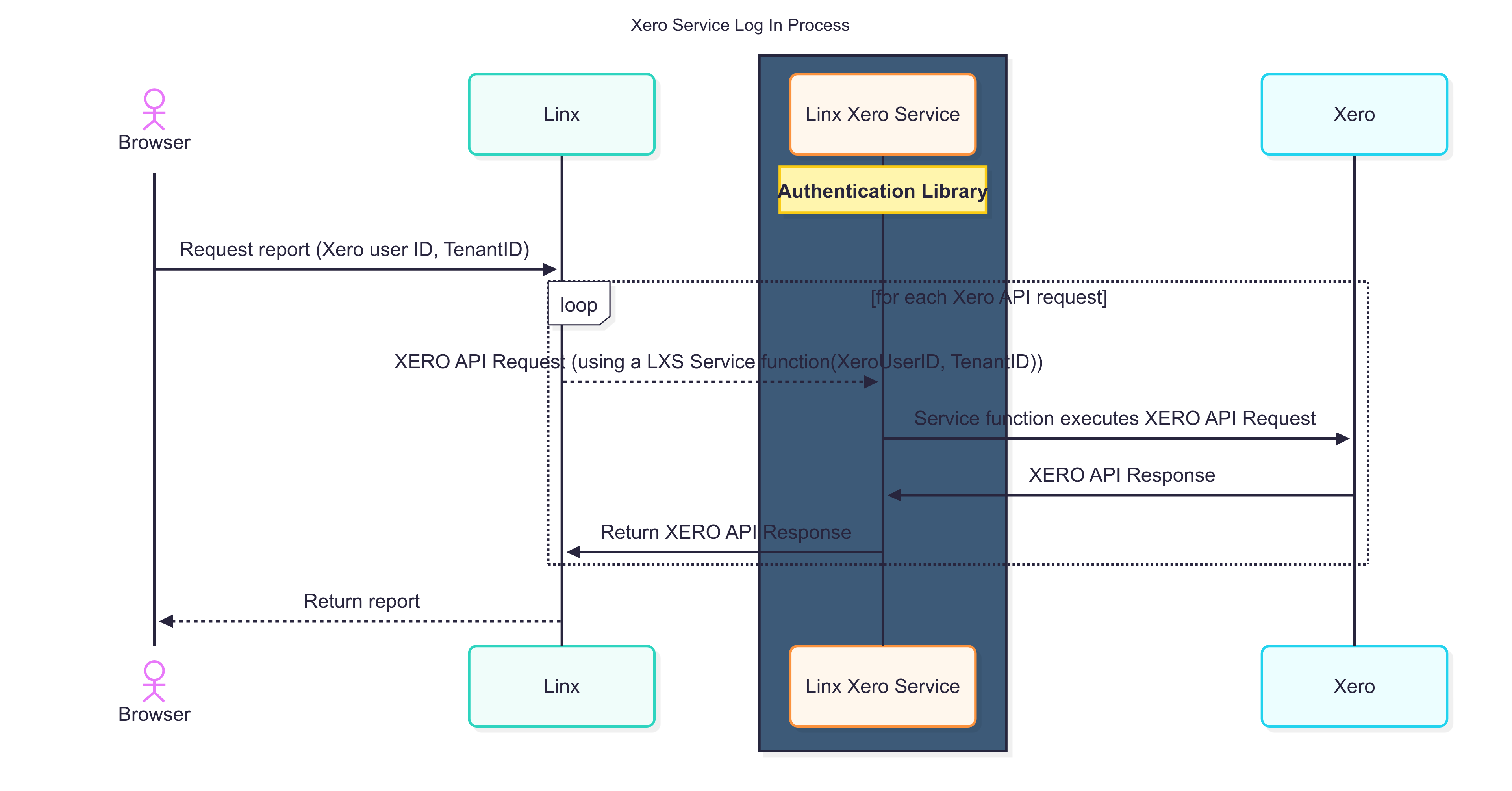
The following diagram illustrates the API call flow: