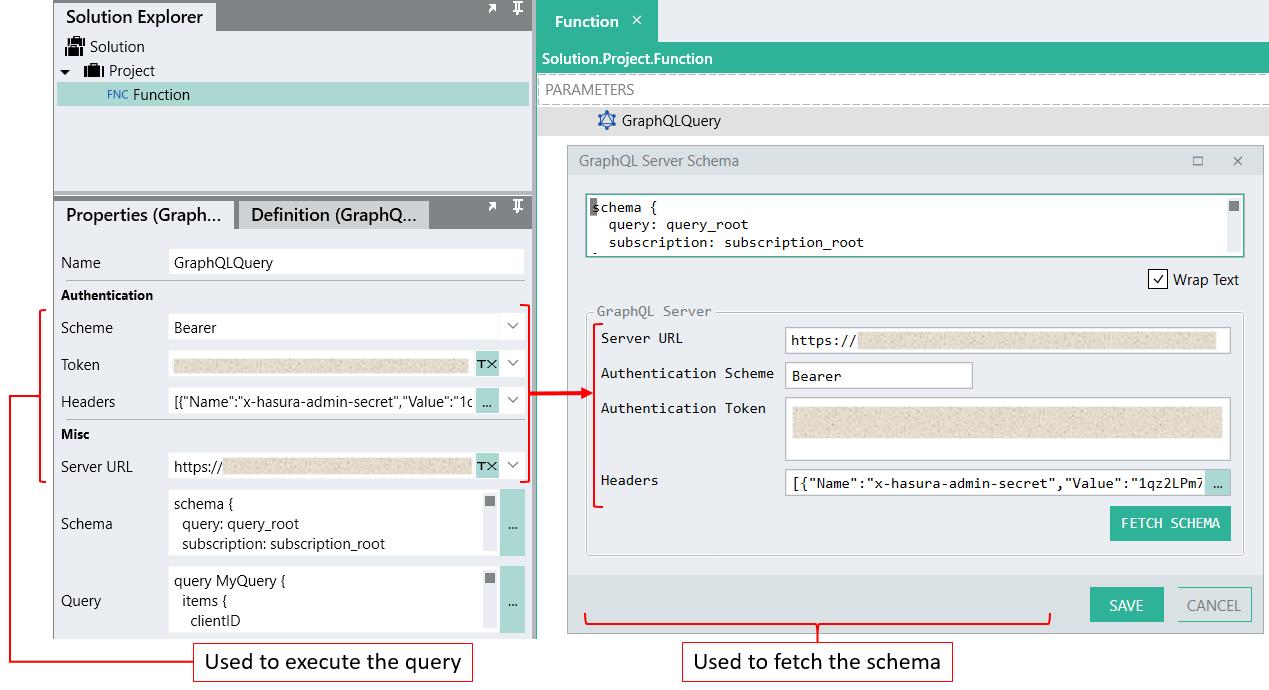
# GraphQLQuery
GraphQL is a query language for APIs and a runtime for fulfilling those queries with your existing data.
{% hint style="info" %}
**Quick Steps:**
1. Add the **GraphQL** plugin to your solution.
2. Drag the **GraphQLQuery** function onto the design canvas.
3. Set the **properties** for GraphQLQuery. (See below for details.)
4. Click the Schema property's **\[...]** icon to add or fetch a schema for your GraphQL server.
5. Click **Debug** (on the top toolbar) to test and debug your solution.
{% endhint %}
***
## Properties
### Scheme
The GraphQL server authentication scheme, for example 'Bearer'.
### Token
The authentication token provided by your GraphQL server.
### Headers
Request headers, if required by the GraphQL server.
Click on the **\[...]** icon to open the **Request Headers editor** from which headers can be added as name-value pairs:
### Server URL
The URL of the GraphQL server.
### Schema
The schema of the GraphQL server.
Click on the **\[...]** icon to open the **GraphQL Server Schema editor**:
You can paste a schema directly into the editor, or you can fetch a schema from your GraphQL server.
The following properties are design-time properties that are required for fetching a schema:
* Server URL
* Authentication Scheme
* Authentication Token
* Headers
Click the **Fetch Schema** button to fetch the GraphQL schema from the GraphQL server.
{% hint style="info" %}
**Note:**\
The *Server URL*, *Authentication Scheme*, *Authentication Token*, and *Headers* properties in the **GraphQL Server Schema editor** popup are only used to retrieve the database schema, not to execute the query.
If you have provided values for the run-time properties, then those values will also display in the **GraphQL Server Schema editor** if the values can be resolved at design time. For design-time testing, if required, you can enter different values in the editor, but the values in the run-time properties will not change and will apply at run-time.
{% endhint %}
### Query
The GraphQL query to execute.
The **GraphQLQuery** function supports queries and mutations which can be added in the Query property.
To learn more about queries and mutations, please view the latest [GraphQL specification](https://spec.graphql.org/June2018/#sec-Language.Operations).
#### Query parameters
Only available when your query is referencing input parameters.
The name of each parameter will be listed in this section, with an input field for each. Provide the value for each parameter.
Example:
***
## Links
[graphql.org](https://graphql.org/)
[howtographql.com](https://www.howtographql.com/)
[hasura.io](https://hasura.io/learn/graphql/intro-graphql/introduction/)
[towardsdatascience.com](https://towardsdatascience.com/learning-graphql-4e913f12640d)